
Falcon Parameters Overview
The Falcon Parameters section allows you to customize how Deep Signal Falcon operates, displays results, and logs activity. These settings control both the visual presentation of the indicator and its underlying behavior.
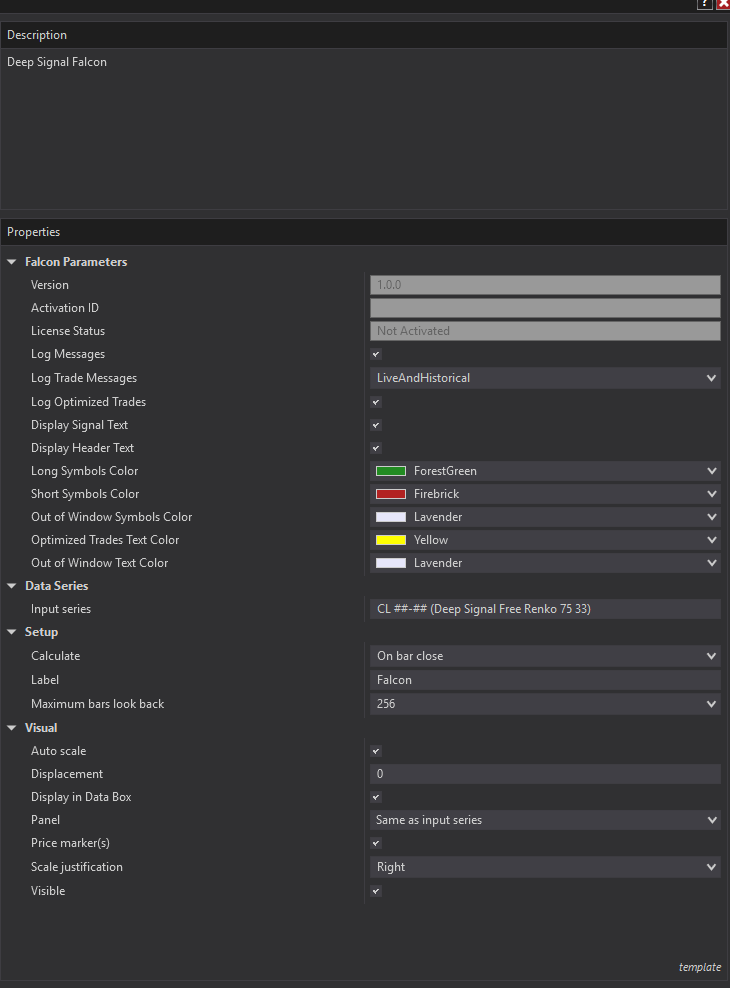
General Settings
- Version – Displays the current installed version of Falcon.
- Activation ID / License Status – Used to show activation id and status for your license. The license must be active for live use.
Logging Options
- Log Messages – Enables general diagnostic messages in the NinjaScript Output window.
- Log Trade Messages – When enabled, Falcon records trade-related events such as trade entry detection with profit targets and stop-losses in the NinjaScript Output window. Falcon can log both live and historical trades, live trades only, historical trades only or turned off.
- Log Optimized Trades – Determines whether Falcon logs the optimization information from Falcon at the beginning of each session. The optimization information includes the Falcon Score for the period and the optimized trading time period.
Display Settings
- Display Signal Text – Toggles the display of the text markers (e.g., “Long Entry” or “Short Entry”) that appear beside the chart symbols.
- Display Header Text – Shows or hides the indicator’s header label on the chart.
Color Customization
You can customize the colors of Falcon’s chart symbols for clear visual distinction:
- Long Symbols Color – Sets the color for long (buy) entries.
- Short Symbols Color – Sets the color for short (sell) entries.
- Out of Window Symbols Color – Defines the color of trade markers that fall outside the optimized time window.
- Optimized Trades Text Color – Sets the color of text labels for trades inside the optimization window.
- Out of Window Text Color – Sets the color of text labels for trades outside the optimization window.
Data and Calculation
- Input Series – Specifies the data source Falcon uses for analysis. It is recommended to use Deep Signal Free Renko 75 for best results.
- Calculate – Determines how often Falcon updates (e.g., On each tick or On bar close).
- Label / Maximum Bars Look Back – Controls the label displayed in the chart’s indicator panel and the number of historical bars used for calculations.
Futures, foreign currency and options trading contains substantial risk and is not for every investor. An investor could potentially lose all or more than the initial investment. Risk capital is money that can be lost without jeopardizing ones financial security or lifestyle. Only risk capital should be used for trading and only those with sufficient risk capital should consider trading. Past performance is not necessarily indicative of future results.