
Tuning Falcon
Falcon will always try to find the optimized trade entry, profit targets, and stop losses for any particular instrument and its corresponding Renko brick size. However, some brick sizes perform better than others for different instruments. It’s important to tune Falcon to the instrument that will be traded for optimum results.
Below is a quick summary of the tuning process, followed by detailed instructions.
Quick Summary
- Optimization is done by adjusting the brick size of the Deep Signal Falcon Renko bar type.
- Run Falcon on a chart using the Deep Signal Falcon Renko bars.
- Record the brick size and the Falcon Score shown on the chart or in the NinjaScript Output window.
- Adjust the brick size up or down.
- Re-run Falcon and record the new brick size and score.
- Repeat the process until you find the brick size that yields the highest Falcon Score.
- Use the highest-scoring brick size for ongoing analysis.
- Re-optimize monthly or during periods of high market volatility.
Tuning Details
Adjusting Deep Signal Free Falcon Renko Brick Size
- Open a new chart in NinjaTrader for your selected instrument (for example, ES, NQ, or CL).
- In the Data Series window, select Deep Signal Falcon Renko as the bar type.
- Adjust the Brick size parameter to your starting value (for example, 10, 15, or 20 ticks).
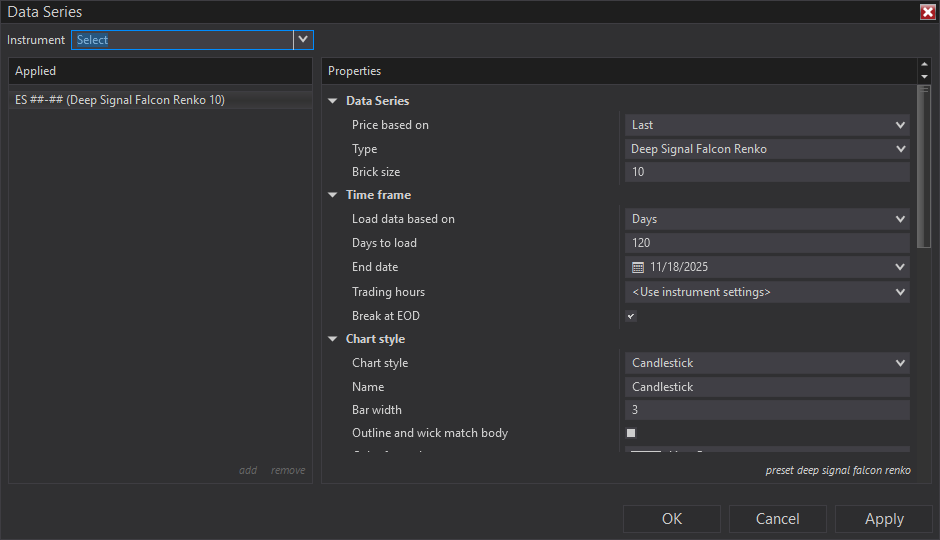
- Click OK to apply the change.
Running Falcon on a Chart
- Right-click on the chart and select Indicators.
- From the list of available indicators, select DeepSignal -> AI-> Indicators -> Falcon and click Add.
- Configure any Falcon-specific parameters (for example, whether to display for text for entries, profit targets and stop losses).
- Click OK to apply Falcon to the chart.
- If the Falcon license has already been authenticated, Falcon will display its calculated entry points, take profits, stop losses, and a Falcon Score for the current session.
- If Falcon has not been authenticated, then it will need to be authenticated with the activation id that was emailed. Please see the License Manager section for more information.
Recording the Brick Size and Falcon Score
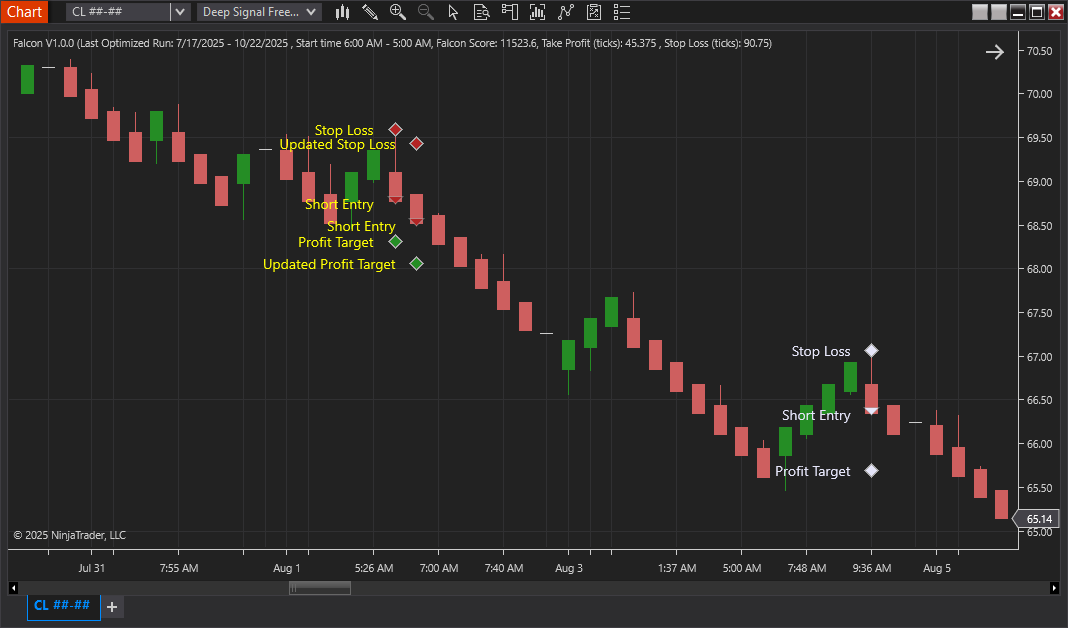
- In the NinjaScript Output window or on the chart, note the Falcon Score shown for the current configuration. The Falcon Score is located on the top left side of the chart or is in the NinjaScript Output Window. As Falcon loads on a chart it will optimize at the beginning of each session. Wait until Falcon is done optimizing and has the last date of the time frame to record the Falcon Score.
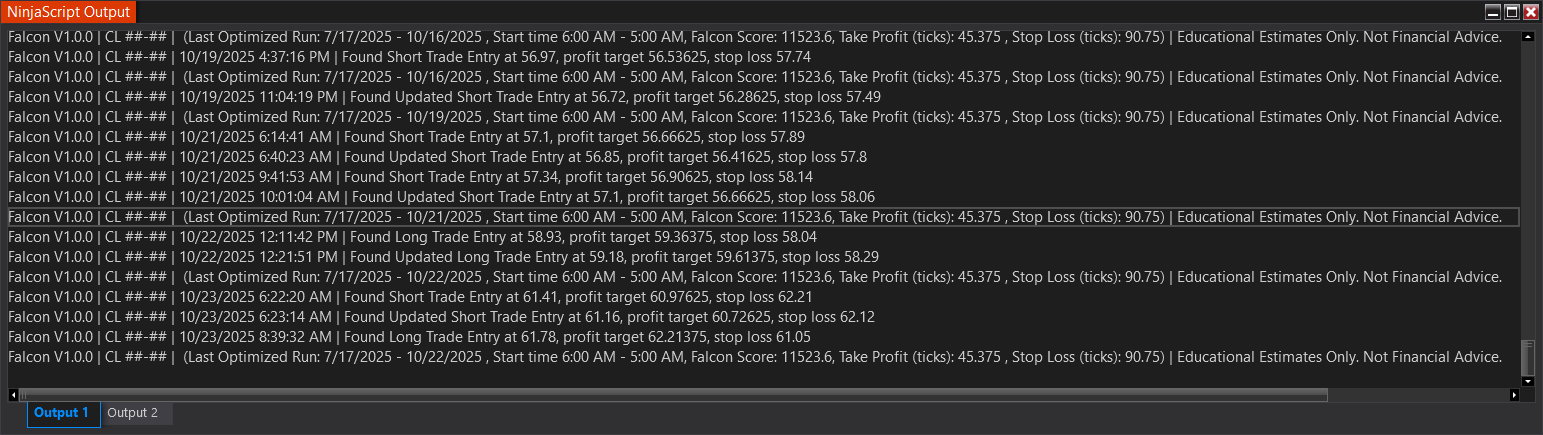
The Falcon Score is logged in the NinjaScript Output window at the bottom of the window.
- Record both the Brick Size and Falcon Score in a spreadsheet or notepad for comparison.
- A higher Falcon Score generally indicates better alignment between Falcon’s internal model and the instrument’s price behavior.
Adjusting and Re-running Falcon
- Return to the Data Series settings and adjust the Brick Size slightly up or down.
- Re-run Falcon with the new brick size and observe the updated Falcon Score.
- Continue testing several nearby brick sizes until you identify the configuration that produces the highest score.
- Once found, save this configuration as a chart template in NinjaTrader for future use.
Futures, foreign currency and options trading contains substantial risk and is not for every investor. An investor could potentially lose all or more than the initial investment. Risk capital is money that can be lost without jeopardizing ones financial security or lifestyle. Only risk capital should be used for trading and only those with sufficient risk capital should consider trading. Past performance is not necessarily indicative of future results.