
Deep Signal Order-to-Trade Ratio (OTR) – Parameters
This section describes each configurable parameter for the OTR indicator and how it affects behavior, responsiveness, and visualization.
Overview
The Deep Signal Order-to-Trade Ratio (OTR) measures the level of order book activity relative to executed trades, providing insight into the quality and efficiency of market liquidity.
By comparing how many orders are being placed, modified, and canceled versus how many actually result in trades, OTR helps identify whether market activity is genuine participation or excessive noise.
Low OTR values indicate a balanced, efficient market where orders translate into trades. High OTR values suggest increased order churn, which may signal reduced liquidity quality, higher slippage risk, or potential manipulation such as spoofing and layering.
Here is the Properties dialog that contains the Order-to-Trade (OTR) parameters.
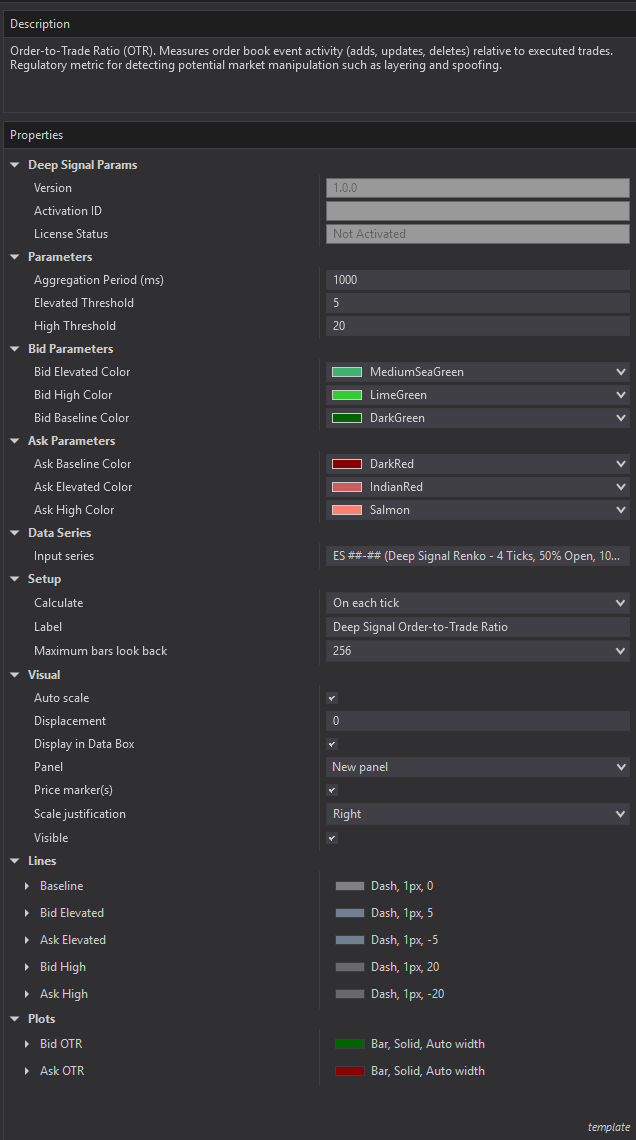
Parameters
Aggregation Period (ms)
- Default: 1000
- Range: Typically 100 – 5000+ ms
Defines the time window used to accumulate:
- Order book events (adds, updates, deletes)
- Executed trades
At the end of each window, the OTR value is calculated and reset.
How to Use:
- Shorter period (e.g., 250–500 ms):
- More responsive to rapid changes
- Higher noise
- Best for scalping / high-frequency environments
- Longer period (e.g., 1000–3000 ms):
- Smoother signal
- Better for identifying sustained conditions
- Preferred for swing or general context
Elevated Threshold
- Default: 5
Defines the level at which OTR transitions from normal to elevated order activity.
Interpretation:
- OTR below this level → normal market conditions
- OTR above this level → increased order churn
Usage:
- Acts as an early warning level for:
- Increasing noise
- Reduced liquidity efficiency
High Threshold
- Default: 20
Defines the level at which OTR is considered extremely elevated.
Interpretation:
- OTR above this level may indicate:
- Spoofing or layering
- Illiquid or unstable market conditions
Usage:
- Used to highlight high-risk environments
- Often paired with reduced position sizing or trade filtering
Bid Parameters
Controls the appearance of the Bid OTR plot, which displays above zero using green shades. Color intensity escalates from dark to light as the OTR magnitude increases.
Color used when OTR is within normal range (below Elevated Threshold).
- Bid Baseline Color: Applied when the bid-side OTR is below the Elevated Threshold. Represents normal or low bid-side order churn relative to executed trades.
- Bid Elevated Color: Applied when the bid-side OTR is below the Elevated Threshold. Represents normal or low bid-side order churn relative to executed trades.
- Bid High Color: Applied when the bid-side OTR is at or above the High Threshold. The lightest and most vivid shade, indicating an unusually high ratio of bid-side order events to trades. May reflect aggressive non-executable bid-side activity such as spoof bids.
Ask Parameters
Controls the appearance of the Ask OTR plot, which displays below zero using red shades. The plotted value is the negation of the computed ask-side OTR — a raw ask OTR of 50 appears as −50 on the chart. Color intensity escalates using the raw positive OTR magnitude for threshold comparisons.
Color used when OTR is within normal range (below Elevated Threshold).
- Ask Baseline Color: Applied when the ask-side OTR magnitude is below the Elevated Threshold. Represents normal or low ask-side order churn relative to executed trades.
- Ask Elevated Color: Applied when the ask-side OTR magnitude is at or above the Elevated Threshold but below the High Threshold. A lighter red indicating above-average ask-side order activity that merits monitoring.
- Ask High Color: Applied when the ask-side OTR magnitude is at or above the High Threshold. The lightest red shade, signaling an extreme ask-side order-to-trade ratio. May indicate spoof asks, aggressive non-executable offer quoting, or extremely thin ask-side liquidity.
Data Series
Input Series
Defines the instrument and bar type the indicator is applied to.
Note:
- OTR uses event-driven data (Level 2 + trades)
- Chart type does not affect calculation accuracy
Setup
Calculate
- Must be set to OnEachTick
Why:
- Ensures all order book and trade events are captured in real time
Best Practices
- Use Elevated (5) and High (20) as default thresholds for most markets
- Lower thresholds for:
- Highly liquid instruments (ES, NQ scalping)
- Increase aggregation period to:
- Reduce noise in slower markets
Summary
The OTR parameters allow you to control:
- Sensitivity → via Aggregation Period
- Risk thresholds → via Elevated and High levels
- Visual clarity → via color and line settings
Proper tuning helps distinguish between normal market activity and potentially deceptive or unstable liquidity conditions.
Futures, foreign currency and options trading contains substantial risk and is not for every investor. An investor could potentially lose all or more than the initial investment. Risk capital is money that can be lost without jeopardizing ones financial security or lifestyle. Only risk capital should be used for trading and only those with sufficient risk capital should consider trading. Past performance is not necessarily indicative of future results.