
Sample Indicator Input
An example indicator is included that can be used as input for the Trade Analyzer. You will need to modify the TradeAnalyzerSignalSample source code to fit your desired trading signal. The sample indicator is not intended to be used for live trading, only an illustration on how to add trade signals to Trade Analyzer.
After installing the Deep Signal Indicators you will need to compile NinjaTrader before being able to use the TradeAnalyzerSignalSample. Open NinjaScript Editor and compile (F5).
Here is the sample source code that can be used as input to Trade Analyzer. The indicator needs to set the TradeSignal[0] to +1 for Long Trades or TradeSignal[0] to -1 for Trade Trades or set to zero for no trade.
The sample file can be modified to suit your needs as a trade signal for Trade Analyzer.
|
Example Trade Analyzer Input Indicator |
|
namespace NinjaTrader.NinjaScript.Indicators.DeepSignal.Indicators { public class TradeAnalyzerSignalSample : Indicator { private int slowMSA = 16; private int fastMSA = 7;
protected override void OnStateChange() { if (State == State.SetDefaults) { Description = @"Sample Signal Indicator to be used with Deep Signal Trade Analyzer"; Name = "Trade Analyzer Signal Sample"; Calculate = Calculate.OnBarClose; IsOverlay = false; DisplayInDataBox = true; DrawOnPricePanel = true; DrawHorizontalGridLines = true; DrawVerticalGridLines = true; PaintPriceMarkers = true; ScaleJustification = NinjaTrader.Gui.Chart.ScaleJustification.Right; //Disable this property if your indicator requires custom values that cumulate with each new market data event. //See Help Guide for additional information. IsSuspendedWhileInactive = true; AddPlot(Brushes.Goldenrod, "TradeSignal"); } else if (State == State.Configure) { } } protected override void OnBarUpdate() { // Set TradeSignal value to +1 for long trades and -1 to short trades TradeSignal[0] = 0; // Add other indicators needed to determine if a long or short trade should be entered // In this sample we use two simple moving averages, when the fast SMA crosses above the slow SMA // we set a Long signal and when the fast SMA crosses below the slow SMA we set a Short signal. // Any indicators can be used as long as the TradeSignal[0] is set to 1 for Long Trades and -1 for Short Trades if (CrossAbove(SMA(fastMSA), SMA(slowMSA), 1)) TradeSignal[0] = 1; else if (CrossBelow(SMA(fastMSA), SMA(slowMSA), 1)) TradeSignal[0] = -1; } #region Properties [Browsable(false)] [XmlIgnore] public Series<double> TradeSignal { get { return Values[0]; } } #endregion } } |
After adding Trade Analyzer to a chart, we can update the input source.
In the Trade Analyzer Properties dialog, we need to change the Input series towards the bottom of the page.
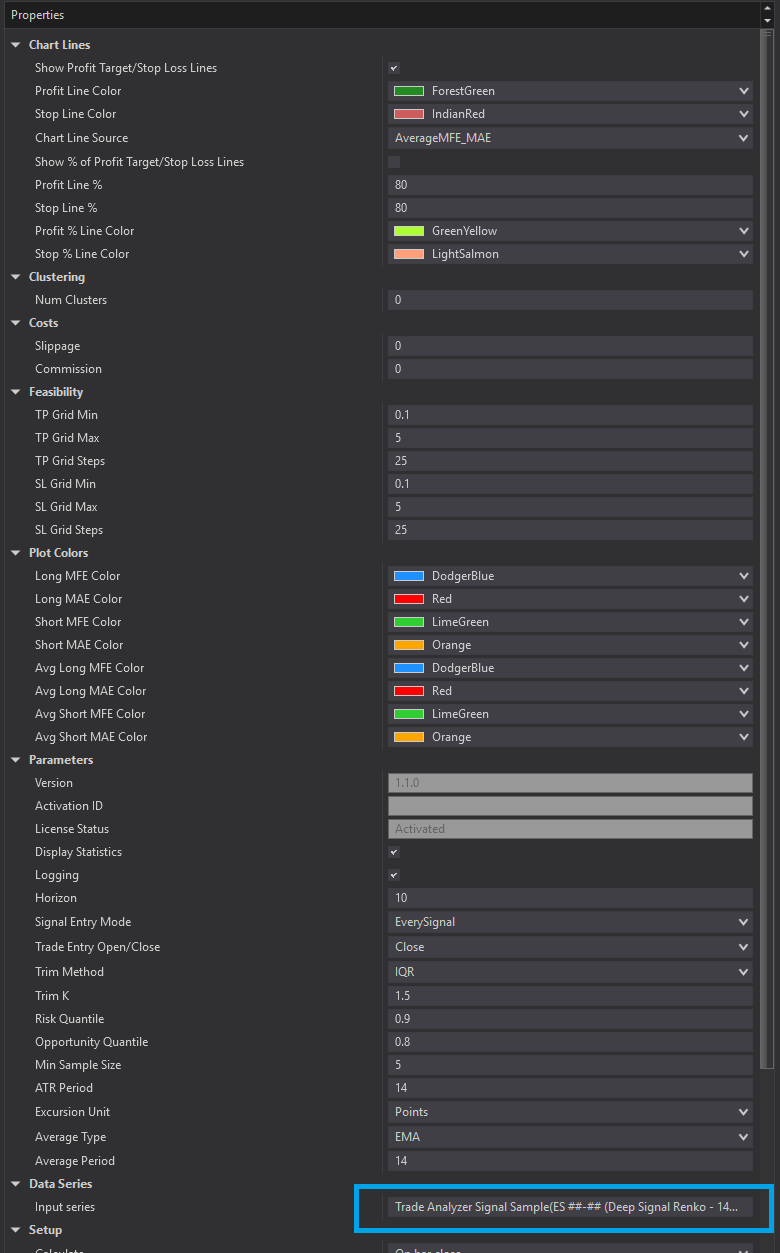
Select the Trade Analyzer Signal Sample.
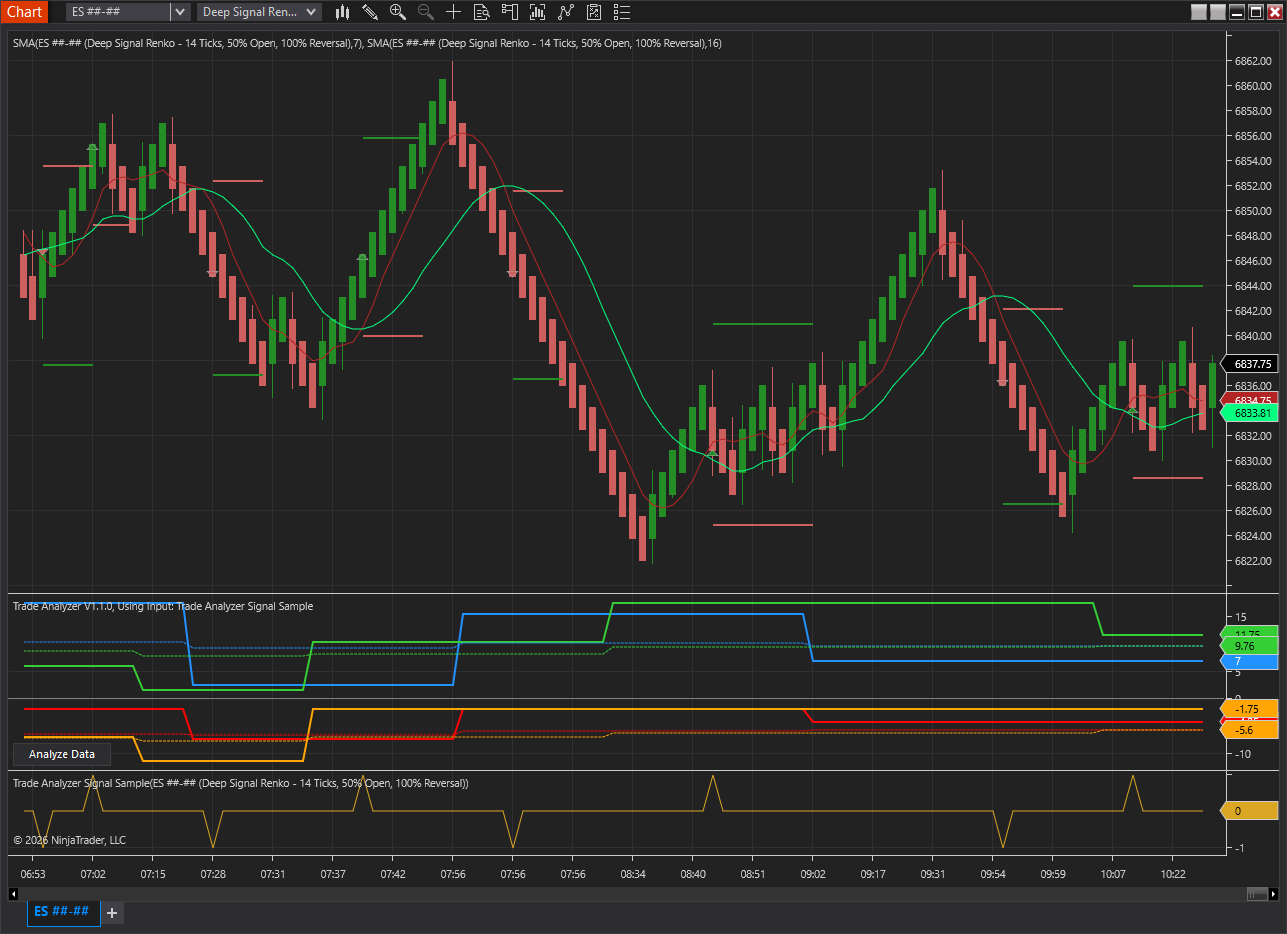
In the chart below we are using the Trade Analyzer Signal Sample as input to Trade Analyzer. We also display the fast SMA and slow SMA. When the fast SMA crosses above the slow SMA we are going long, and when the fast SMA crosses below the slow SMA we go short.
The Red horizontal lines in the chart is the stop loss, which is based on either the MAE or Average MAE. The Green horizontal lines in the chart are profit target lines, which are based on either the MFE or Average MFE.
Futures, foreign currency and options trading contains substantial risk and is not for every investor. An investor could potentially lose all or more than the initial investment. Risk capital is money that can be lost without jeopardizing ones financial security or lifestyle. Only risk capital should be used for trading and only those with sufficient risk capital should consider trading. Past performance is not necessarily indicative of future results.